# AI Agent for weather analysis and insight
**Tools:** Google Colab, Python, SQL, Google BigQuery, Streamlit, Hugging Face LLM, API, VS Code
**Skills:** Data pipeline, LLM evaluation, Bash/CMD, FastAPI, API Documentation, Google Cloud Platform (GCP), Docker, Environment Variables, Prompt Engineering, Data Visualization, UI/UX Design, Git
Artificial Intelligence (AI) and generative AI (GenAI) has no doubt became an unstoppable force that changes the landscape of employment and job market, which was bizarre thinking that OpenAI only released their now widely known ChatGPT model back in November 2022 and since then the public consciousness and percetion were never the same. GenAI technology and the means of using it evolved at an blindly fast speed (with leaps of improvement made within the timespan of a year), and continues to demand rapid catching-up for tech industries on its latest development. With the field of data analytics requiring consuming and analyzing excessively large datas within very tight deadlines, it is become clear that, whether we like it or not, we will eventually need the help of AI to give us fast, accurate insight in an almost real-time reaction in order to keep up with the data analysis demand.
As I am intrigued in how AI can helping us out in analyzing data and giving us back useful insights, I decided to start a project that is about buidling an AI Agent to give users weather analysis and insights of weather changes of the past days. This project aims to examine how AI can be used in helping us and the stakeholders who need our services for gathering insights from data in an more user-friendly and quick way.
## LangChain... and how does it work?
I have never involved in developing any sort of AI Agents before. I don't even know how to write codes to do tasks that even resemble GenAI of any sorts. So before I actually start doing the real work for building the AI Agent, I decided to do some basic exploration of what GenAI development is all about.
LangChain is an open-source AI Agent framework that can be used to build application coupled with Large Language Models (LLMs). It simplifies complex workflows by standardizing interfaces for different models, allowing developers to easily integrate LLMs with data sources, create multi-step reasoning processes (agents), and build applications that go beyond simple text generation.
> A framework for LLM applications
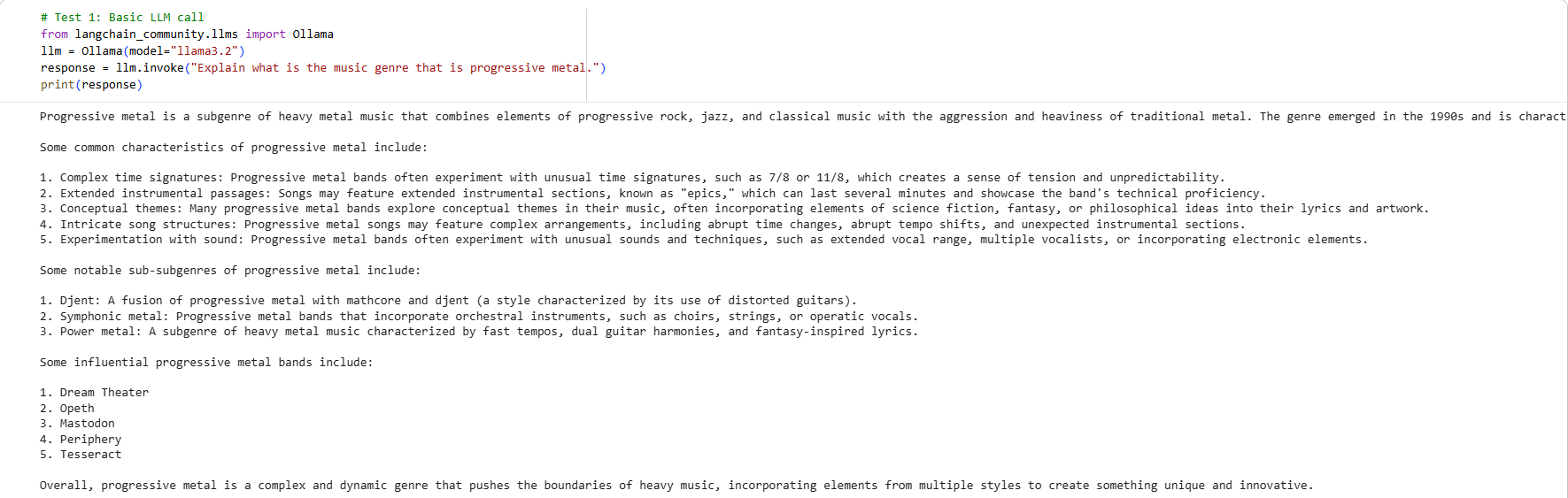
In order to get an idea of how AI Agent framework works, I set up a Google Colab notebook, pip install the LangChain framework, and pull a Llama 3.2 (local model) into the framework. We first attempted a basic LLM call by defining a LLM model and invoke a simple inquiry and see if the model responds.
> Basic LLM call. The model successfully responded.
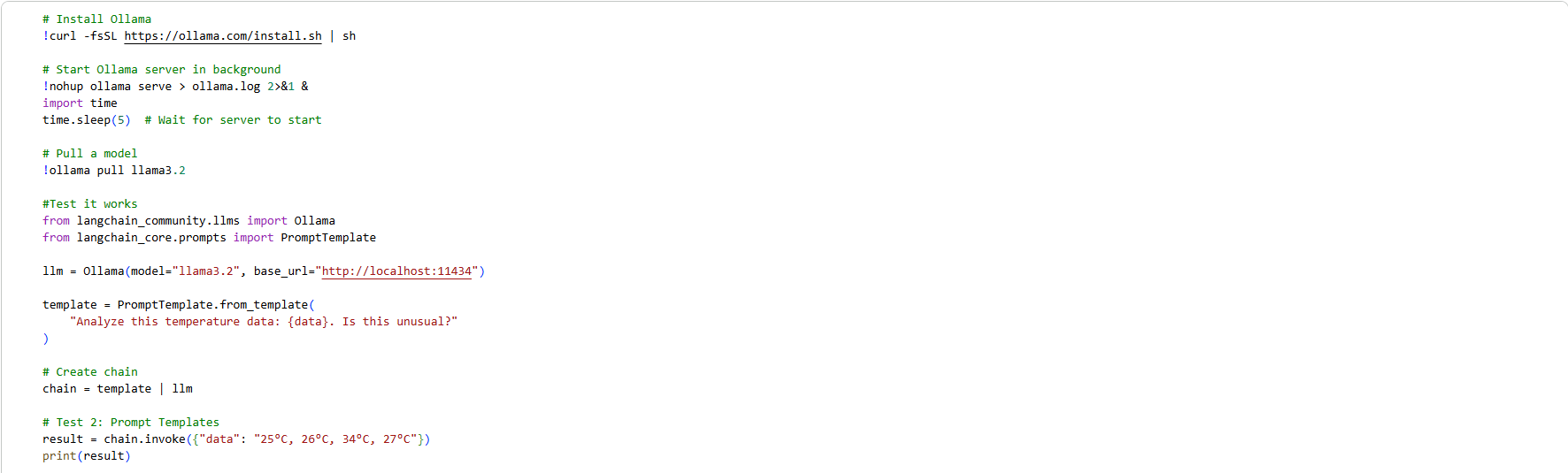
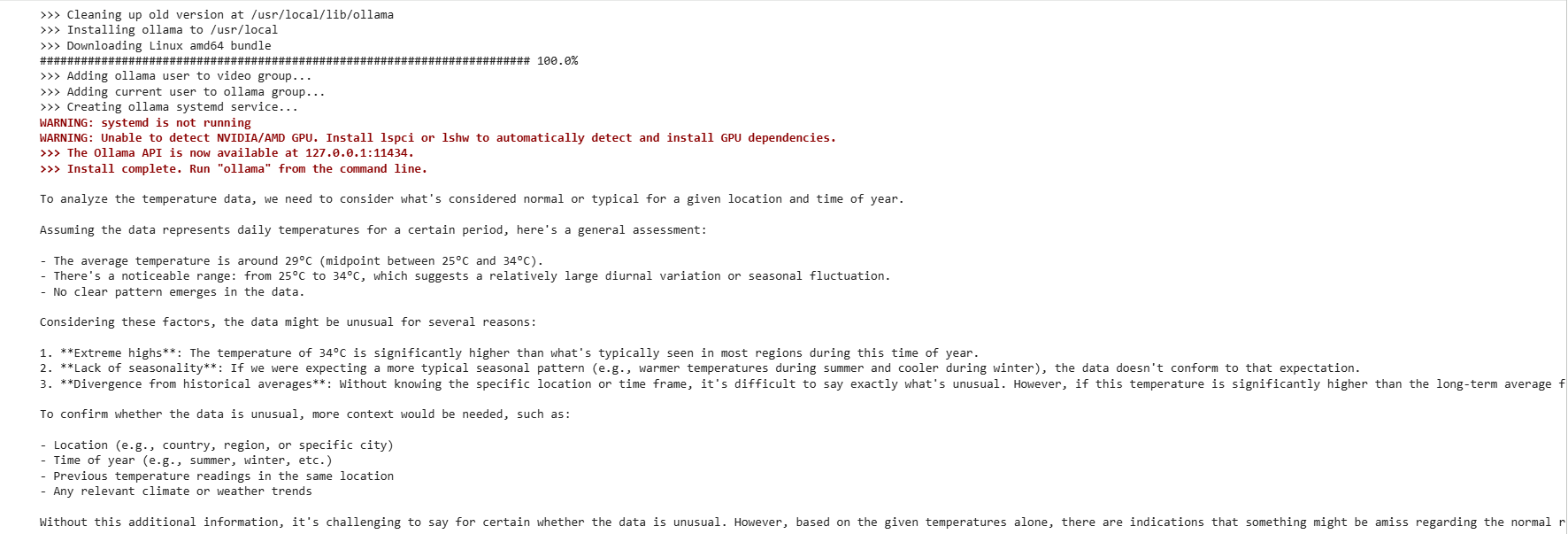
Next, we provided the model with a template prompt to analyze and report any unusual weather pattern or development by provide the model four daily temperatures. The model will then how to analyze and provide insight back to us whether if there is any unusual weather pattern or not.
> The model responded to a set of temperature data according to a predefined template.
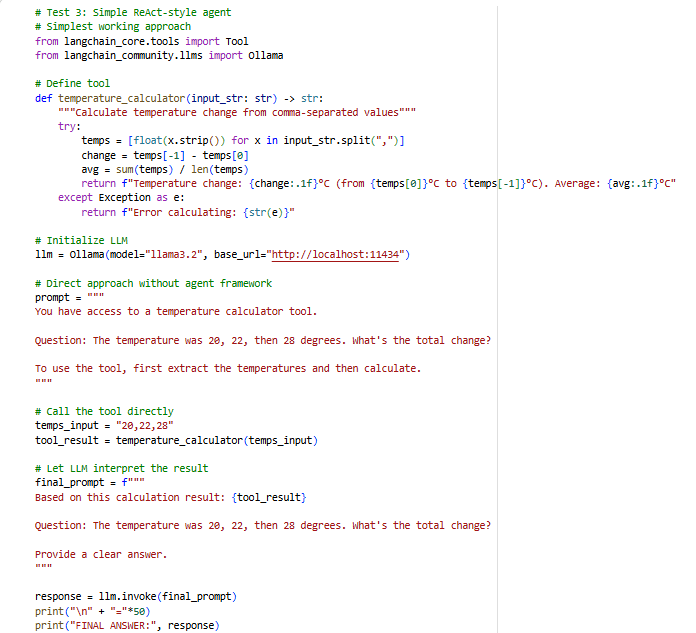
I have also attempted to ask the model to generate another response, this time without the framework itself but instead rely on predefined tools to analyze the difference in temperature, in a style known as ReAct (reasoning + acting).
> Simple ReAct-style agent without involving the framework.
## How to set up Google BigQuery for our LangChain framework - Addtional tools for the agent
For this project, we will be using a weather dataset provided by National Oceanic and Atmosphere Administration (NOAA). The data comes from one of their weather radios under NOAA in the United States, which is stored in Google BigQuery.
After installing the BigQuery client into a second Google Colab notebook, and authenticate user information using my own Google account, we first start a new project in Google BigQuery. With a Google BigQuery project started, now we have a project ID to begin our next step.
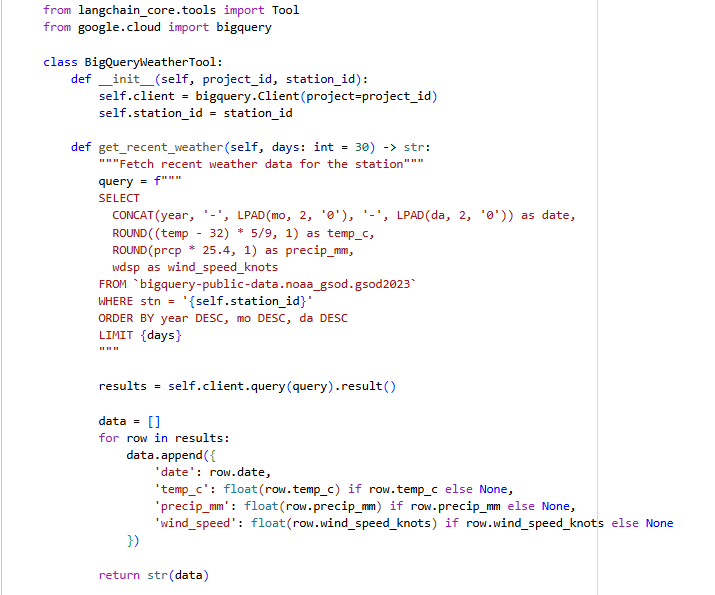
We first write a test SQL query to see if we can successfully pull any data from the NOAA dataset of our chosen station. After we successfully pull data from BigQuery using the test query, we then proceed to choose the station that contains the largest amount of data (count according to the number of rows it returned), and create a BigQuery tool in the notebook where it will programme the LangChain framework the fetch most recent weathewr data for up to 30 most recent days.
> The BigQuery weather tool for detching the most recent weather
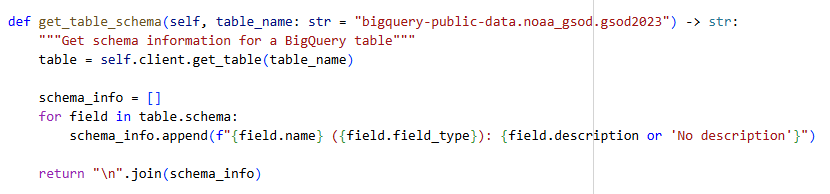
We would also need to define about function for the BigQuery tool where we would want the framework to get the schema information from a BigQuery table. By defining this purpose, the AI Agent framework will store the information of each data extracted in their memeory in case if users ask different questions about the weather data.
> We built a function the get schema information for data extacted.
After successfully fetched data from the weather station dataset that we have chosen of the most recent 7 days as a test of our BigQuery weather tools, our next step is to integrate our BigQuery tool with LangChain. We imported Ollama and pull the Llama 3.2 LLM model into the notebook, and just like our BigQuery tool, we would also need to build the same tools for LangChain to get the most recent weather information and get the table schema for the fetched data.
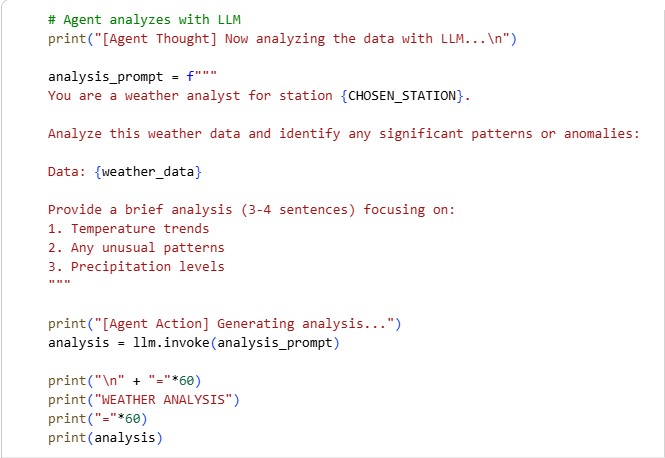
Next, we are going to analyze the weather data of the most recent 7 days using the LLM model in the notebook, according to a pre-defined analysis prompt.
> The AI Agent processed the prompt and genreate a response using the LLM model.
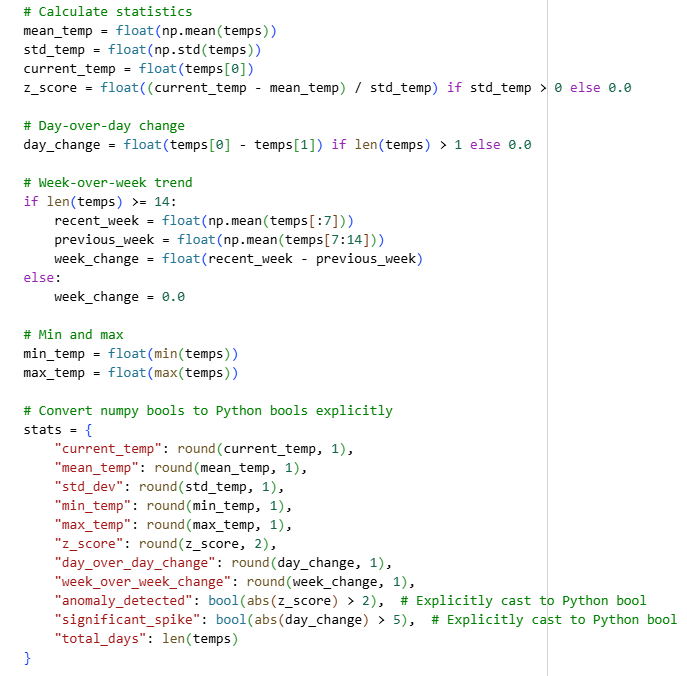
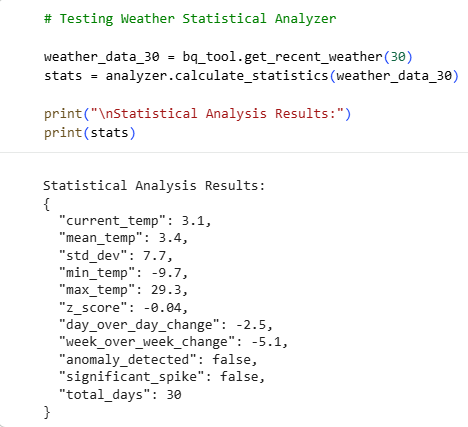
Finally, we have also built a tool to give statistical analysis of the weather dataset predefined by the user as well.
> The statistical analyzer tool
### Weather Analysis Workflow
With all our necessary tools built for the framework, how exactly does the agent work to give users useful insights about the weather data they have asked for?
1. Fetch data from the dataset. In this case, the daqta will be fetched from a predetermied Google BigQuery dataset. The agent will then fetch the data that were up to the past 30 days.
2. Cauculate statistics using the statistical analyzer tool we have built.
3. Check for unusual weather patters over the specified timeframe defined by the user. Did those days have unusual temperature fluctuations?
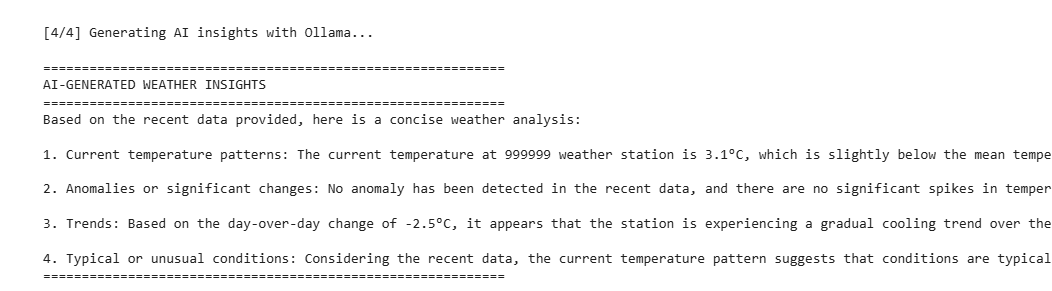
4. The LLM model will generate insights according to the specified timeframe and users' specific question. The agent will respond according to a pre-determied insight prompt template that we have written for the model.
> AI-generated weather insights
## Evaluation with multiple LLM models - which one is the best?
So far we have tested how a AI Agent works, and examined the workflow of generating insights and analysis in natural language. But there are dozens of LLM models to be picked from different providers. Which of the LLM model best serves the purpose of this project?
For evaluating which LLM models would suit best for our project, we are going to evaluate 5 different LLM models and build a multi LLM interface to compare their results using 7 text evaluations and 5 statistical evaluations. These 5 LLM models are:
* Llama 3.2 3B (Ollama)
* Mistral 7B (Ollama)
* Llama 3.2 (Hugging Face)
* Gemini 2.0 Flash (Vertex AI - Tokyo)
* Mistral Large (API)
### Text evaluation - ROUGE and BLEU Score
We evaluated how the models performed in natural lanauage responses by setting up 7 prompts that asks the model to generate responses according to what the prompt asks about specifically, such as temperature range, precipitation, using certain statistical measures to determine the temperature variation, etc. ROUGE and BLEU Score were used to evaluate how the 5 models performed across all 7 text evaluation scenarios.
ROUGE scores and BLEU scores are commonly used text evaluations metrics for LLM models. ROUGE scores are used for measuring the recall (how many words in the generated response matches the golden reference) and precision (is the word length of the generated response matches with the golden reference) of a generated response of a LLM model. BLEU scores are another commonly used metrics, which groups words in a golden reference into chunks and analyze how similar the LLM model generated response is similar to the golden reference by examing how many matching words in chunk and the word order to caluclate its final score.
As for examining the statistical accuracy of the model, I asked the LLM models to calculate and return the mean temperature, standard deviation, min / max temperature, z-score and day over day temperature change, and evaluate their performance based on their respective responses.
### Best model for the project
The decision for this project's best model to be used is based on the average ROUGE scores, average BLEU scores, average statistical accuracy, the average response time and the overall score of all above items. After comaring the overall scores of all 5 LLM models, the Llama3.2 (Hugging Face) model is the best performed model of all 5.
## The actual work - start building an AI Agent
Now that we have go through some fundamental steps of building a model, and also choosing the most suitable LLM model for this project, it is time to get into the real important work of building a dedicated AI Agent for providing the weather analysis and insights we need.
### Key Components of the AI Weather Agent
#### `app.py`
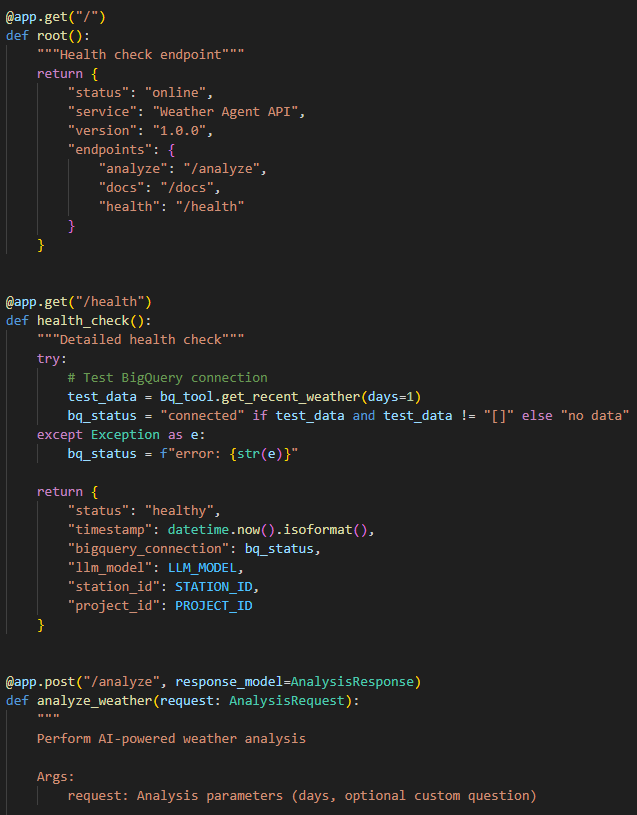
This is the core central componennt of the entire AI Agent framework. You may say this is the heartbeat of the entire AI Agent, because without this component the AI Agent will not be able to coordinate data retrival, statistical analysis and AI generation into a single call from the user. It receives a request, calls the BigQuery and analysis logic from `tools.py`, builds a prompt, calls the LLM API, and returns a structured JSON response.
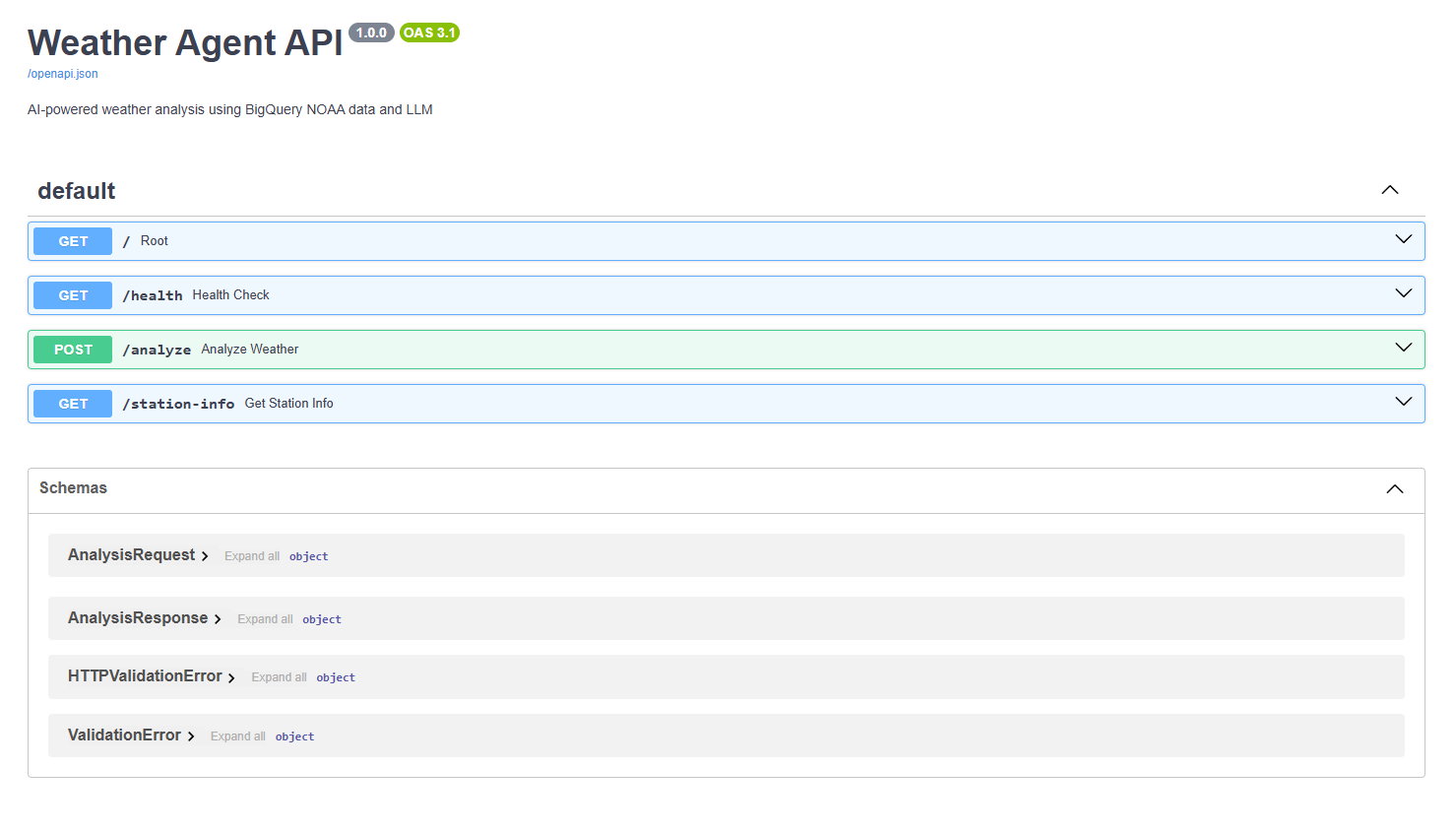
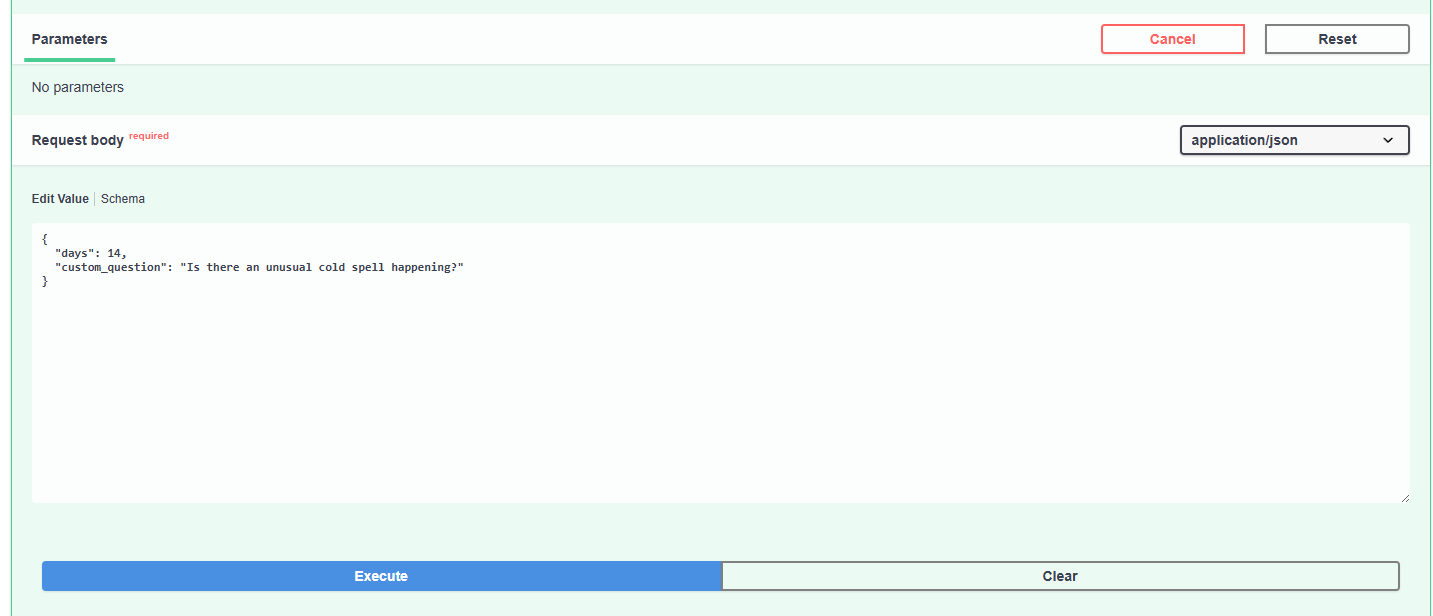
in this script, we will also build FastAPI endpoints where we can perform health check and, through an FastAPI interface, perform weather analysis according to a custom prompt.
> The FastAPI interface, where we can check the health status and prompt the AI Agent to perform analysis.
#### `tool.py`
This is pretty much similar to what we have done above when it comes to creating "tools" for the LLM model. Here, we have created two classes for this script: `BigQueryWeatherTool` to fetch weather information from the predesignated dataset using a SQL query to analyze the most recent weather pattern, and `WeatherAnalyzer` which performs statistical cauculation to the weather data. This script can be considred as the AI Agent's "hand", where these pair of hands will be used for fetching real weather data and turning it into meaningful statistics.
#### `Dockerfile`
This packages the AI agent into a self-contained container so it can be deployed reliably to Google Cloud Run as a production API. It specifies the base Python image, installs dependencies from `requirements.txt`, copies your source code, and defines how to start the FastAPI server.
### `streamlit_app.py`
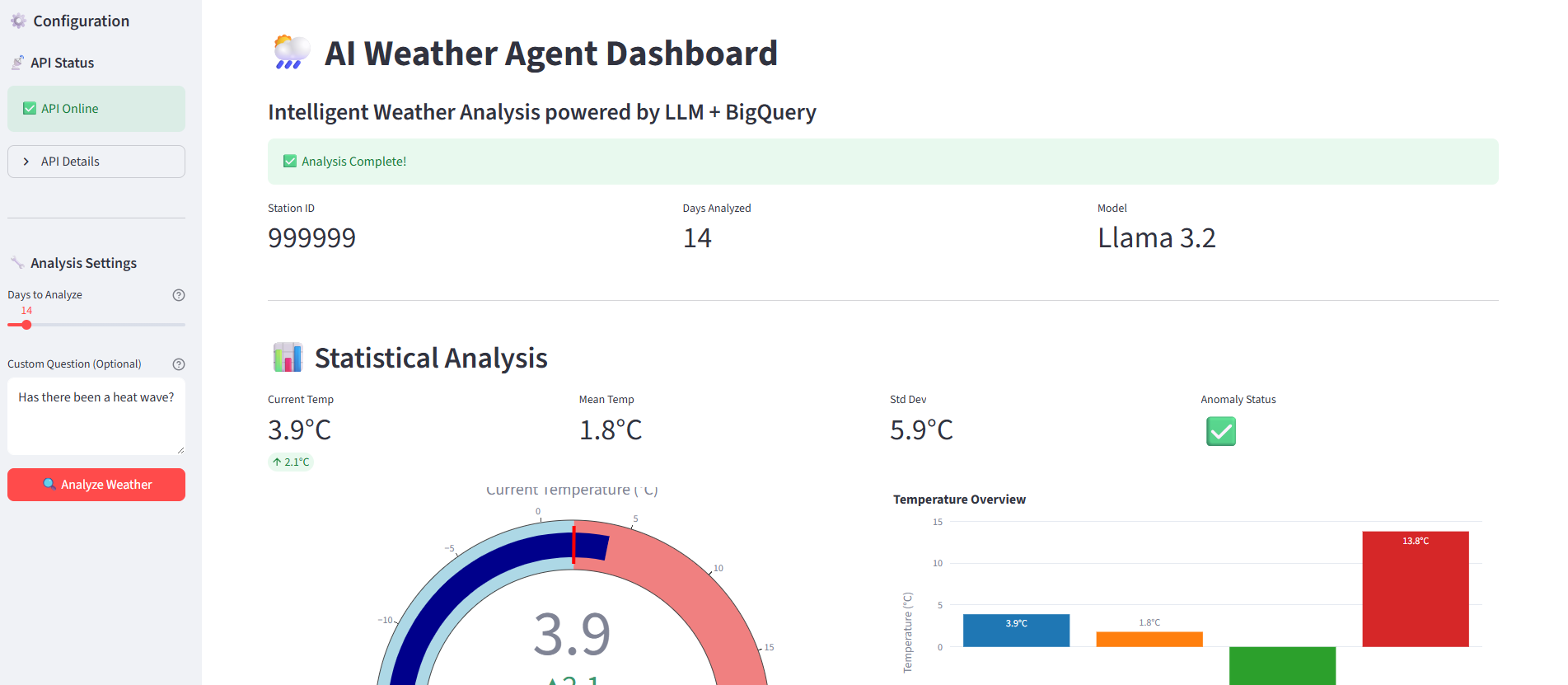
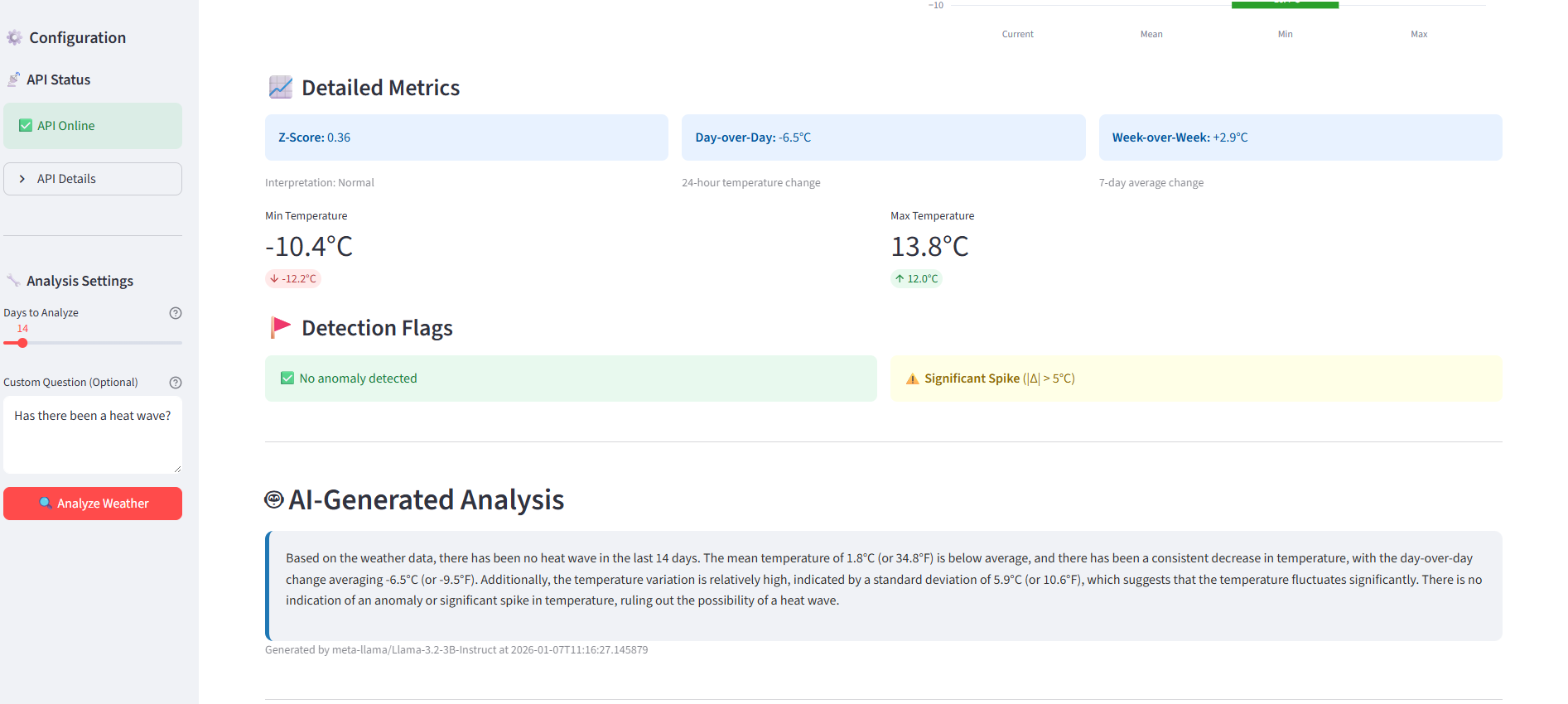
This turns the AI agent into a live, interactive dashboard that’s suitable for demos, stakeholders, and portfolio viewers. The user interface is built via Streamlit that provides controls (like sliders for number of days and a text box for custom questions) and visualizations (metrics, charts, gauges) so non-technical users can explore the agent’s capabilities without touching the API directly.
> The Streamlit UI for user interaction.
## Conclusion: From Experimentation to Production AI Agent
This project represents a complete journey from AI exploration to production deployment, demonstrating how to transform a raw idea into a working, scalable AI system that delivers real business value. Starting with basic LangChain experiments in Google Colab, I systematically built a multi-layered AI Weather Agent that combines real-world data from NOAA's weather dataset via BigQuery, statistical intelligence, and natural language generation powered by Llama 3.2. Rather than jumping straight to coding, I followed a disciplined approach: exploring what AI agents can do, rigorously evaluating multiple LLMs using ROUGE and BLEU scores, architecting the data pipeline and tool layer, implementing a production API with proper error handling, and finally deploying to cloud services. The final system delivers end-to-end automation from user request to AI insights, wrapped in a production-grade API deployed on Google Cloud Run and an interactive Streamlit dashboard for stakeholder demonstrations.
### **Business Value and Real-World Impact**
The AI Weather Agent solves concrete problems that matter in data analytics. It reduces analysis time from hours to seconds, automatically flags unusual weather patterns using statistical anomaly detection, answers custom questions in natural language, and provides a stakeholder-friendly dashboard that eliminates the need for SQL or API knowledge. The cloud-native architecture with auto-scaling means the system can handle anything from a single user to thousands of concurrent requests without manual intervention. It's a template for how AI can transform data analysis workflows in real organizations that need fast, accurate insights under tight deadlines.
### **Future Improvements and Extensions**
While the current system is production-ready, several enhancements would elevate it to enterprise-grade. Implementing automated scheduled reports would enable daily weather summaries delivered via email or Slack, with smart alerting when anomalies are detected. Expanding from a single weather station to multi-station support would allow users to compare weather patterns across cities worldwide. Adding forecasting capabilities by integrating external weather APIs would provide predictive insights alongside historical analysis. Building a comprehensive alerting system with configurable thresholds for temperature spikes, precipitation extremes, and z-score anomalies would serve operational teams who need real-time weather monitoring. Enterprise features like authentication, API key management, rate limiting, Redis caching for repeated queries, and a PostgreSQL database for storing analysis history would make the system suitable for commercial deployment. Finally, developing a mobile-first interface with React Native and push notifications would bring weather intelligence directly to users' pockets.
For the files used for this project, please visit the [GitHub repository](https://github.com/cedricyu000925/AI-Weather-Agent-API).